# Lovelace com diferentes apresentações
**URL:** https://forum.cpha.pt/t/lovelace-com-diferentes-apresentacoes/1460
**Category:** Configuração
**Tags:** hassio
**Created:** [28 Novembro , 2018 10:29 UTC](https://forum.cpha.pt/t/lovelace-com-diferentes-apresentacoes/1460 "2018-11-28T10:29:02Z")
**Posts on this page:** 7
**Page:** 1
### Author:  [@jarmilitao](https://forum.cpha.pt/u/jarmilitao)
#### Post date: [28 Novembro , 2018 10:29 UTC](https://forum.cpha.pt/t/lovelace-com-diferentes-apresentacoes/1460/1 "2018-11-28T10:29:03Z")
Vivam!
Tenho o Hassio instalado num raspberry pi e, como estou a configurá-lo ando com ele na mala.
Quando no trabalho o ligo directamente à internet tenho esta cara
 !
Quando o ligo em casa onde tenho um router da Mikrotik tem esta cara
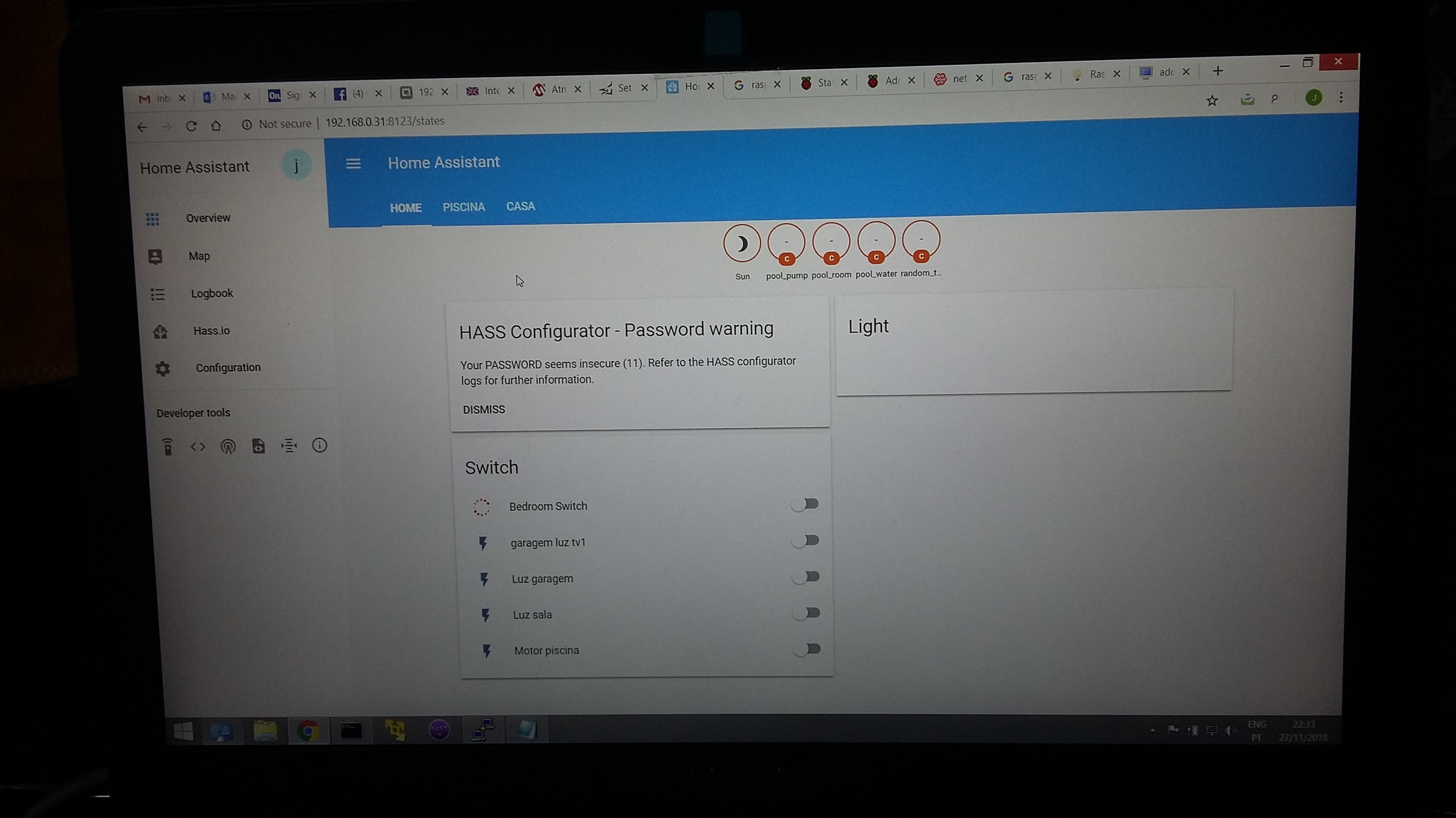!
Alguem me consegue dar uma pista do que poderá ser?
Há algum log do lovelace onde possa ter pistas do que acontece?
Obrigado.
```
title: My Awesome Home
# Include external resources
resources:
# - url: /local/my-custom-card.js
# type: js
# - url: /local/my-webfont.css
# type: css
- url: /local/gauge-card.js?v=1
type: js
# - url: /local/weather-card.js
# type: js
- url: /local/vertical-stack-in-card.js?v=0.0.2
type: js
# - url: /local/mycard.js
# type: js
# Optional background for all views. Check https://developer.mozilla.org/en-US/docs/Web/CSS/background for more examples.
#background: center / cover no-repeat url("/background.png") fixed
# Exclude entities from "Unused entities" view
excluded_entities:
- weblink.router
views:
#--------------------------------------------------------------
# View my tab.
- icon: mdi:home-circle
title: Home
# Optional unique id for direct access /lovelace/${id}
id: home
# Optional background (overwrites the global background).
#background: radial-gradient(crimson, skyblue)
# Each view can have a different theme applied. Theme should be defined in the frontend.
theme: dark-mode
# The cards to show on this view.
cards:
# - type: "mycard"
# entity: light.garagem_luz_tv
- type: entities
entities:
- group.casa
- group.piscina
# The picture entity card will represent an entity with a picture
- type: custom:gauge-card
title: Temperature
entity: sensor.random_temperature
min: -20
max: 35
- type: entities
entities:
- light.luz_sala
- type: picture-entity
image: /local/img/mobile1.jpg
entity: switch.Bedroom Switch
#--------------------------------------------------------------
- icon: mdi:swim
title: Piscina
id: piscina
cards:
- type: vertical-stack
# - type: vertical-stack-in-card
cards:
- type: markdown
title: Piscina
content: >
# Welcome to your **Lovelace UI**.
- type: entities
entities:
- switch.motor_piscina
- light.luz_piscina
- type: custom:gauge-card
title: Temperatura agua piscina
entity: sensor.pool_water
min: 0
max: 30
- type: custom:gauge-card
title: Temperatura casa bomba
entity: sensor.pool_room
min: -5
max: 50
- type: custom:gauge-card
title: Temperatura bomba
entity: sensor.pool_pump
min: -5
max: 70
#--------------------------------------------------------------
- icon: car-side
title: Garagem
cards:
# The markdown card will render markdown text.
- type: markdown
title: Garagem
content: >
# Welcome to your **Lovelace UI**.
- type: entities
entities:
- switch.interruptor_garagem
- light.garagem_luz_tv
# - type: custom:gauge-card
# title: Temperatura agua piscina
# entity: sensor.pool_water
# min: 0
# max: 30
#
#----------------------------------------------------------
- icon: mdi:network
title: Devices
# Optional unique id for direct access /lovelace/${id}
id: devices
# Optional background (overwrites the global background).
#background: radial-gradient(crimson, skyblue)
# Each view can have a different theme applied. Theme should be
# defined in the frontend.
theme: dark-mode
# The cards to show on this view.
cards:
- type: vertical-stack
cards:
- type: markdown
title: Network
content: >
# Welcome to your **Lovelace UI**.
- type: entities
entities:
- switch.motor_piscina
- light.luz_piscina
- light.luz_sala
- switch.bedroom_switch
- type: custom:gauge-card
title: Temperatura agua piscina
entity: sensor.pool_water
min: -20
max: 35
# Specify a tab icon if you want the view tab to be an icon.
#------------------------------------------------------------
# - icon: mdi:weather-cloudy
# # Optional unique id for direct access /lovelace/${id}
# id: Weather
# title: Weather
# cards:
# - type: 'custom:custom-weather-animated'
# entity: input_boolean.weather
#------------------------------------------------------------
# # View tab title.
# - title: Example
# # Optional unique id for direct access /lovelace/${id}
# id: example
# # Optional background (overwrites the global background).
# background: radial-gradient(crimson, skyblue)
# # Each view can have a different theme applied. Theme should be defined in the frontend.
# theme: dark-mode
# # The cards to show on this view.
# cards:
# # The filter card will filter entities for their state
# - type: entity-filter
# entities:
# - device_tracker.paulus
# - device_tracker.anne_there
# state_filter:
# - 'home'
# card:
# type: glance
# image: https://www.home-assistant.io/images/default-social.png
# title: People that are home
#
# # The picture entity card will represent an entity with a picture
# - type: picture-entity
# image: https://www.home-assistant.io/images/default-social.png
# entity: light.luz_piscina
#
# # Specify a tab icon if you want the view tab to be an icon.
#------------------------------------------------------------------
# - icon: mdi:zodiac-taurus
# title: test view
# cards:
# - type: entities
# entities:
# - light.luz_piscina
#
#------------------------------------------------------------------
- icon: mdi:home-assistant
# Title of the view. Will be used as the tooltip for tab icon
title: Second view
cards:
# Entities card will take a list of entities and show their state.
- type: entities
# Title of the entities card
title: Example
# The entities here will be shown in the same order as specified.
# Each entry is an entity ID or a map with extra options.
entities:
- light.luz_piscina
- light.luz_sala
- entity: switch.motor_piscina
# Override the name to use
name: LR Lights
# The markdown card will render markdown text.
- type: markdown
title: Lovelace
content: >
Welcome to your **Lovelace UI**.
```
---
### Author:  [@j\_assuncao](https://forum.cpha.pt/u/j_assuncao)
#### Post date: [28 Novembro , 2018 10:50 UTC](https://forum.cpha.pt/t/lovelace-com-diferentes-apresentacoes/1460/2 "2018-11-28T10:50:46Z")
O que acontece é que estás a utilizar dois PCs diferentes para aceder ao Rpi e falta definir num deles que queres utilizar o Lovelace como interface.
Essa opção funciona por cookie e não por utilizador.
---
### Author:  [@jarmilitao](https://forum.cpha.pt/u/jarmilitao)
#### Post date: [28 Novembro , 2018 10:57 UTC](https://forum.cpha.pt/t/lovelace-com-diferentes-apresentacoes/1460/3 "2018-11-28T10:57:36Z")
E como faço para definir que quero o “lovelace como interface” isso?
---
### Author:  [@j\_assuncao](https://forum.cpha.pt/u/j_assuncao)
#### Post date: [28 Novembro , 2018 13:49 UTC](https://forum.cpha.pt/t/lovelace-com-diferentes-apresentacoes/1460/4 "2018-11-28T13:49:00Z")
Da mesma maneira que fizeste para o outro browser que tem o Lovelace configurado como interface…
---
### Author:  [@joaocosme](https://forum.cpha.pt/u/joaocosme)
#### Post date: [28 Novembro , 2018 19:34 UTC](https://forum.cpha.pt/t/lovelace-com-diferentes-apresentacoes/1460/5 "2018-11-28T19:34:09Z")
Boas. Tal como o @j_assuncao disse, tem a haver com a interface. Tás a usar duas interfaces diferentes. Em cada dispositivo, se quiseres o lovelace, tens que carregar no botão do menu (3 barras horizontais no canto superior esquerdo), depois carregas no icon de informação (um círculo com a letra “i” dentro) e depois aparece uma opcao que diz “set lovelace as default on this device” ou algo do genero. E so carregares, e pronto 😉 Basta entrares de novo e já está com o lovelace
---
### Author:  [@jarmilitao](https://forum.cpha.pt/u/jarmilitao)
#### Post date: [28 Novembro , 2018 19:59 UTC](https://forum.cpha.pt/t/lovelace-com-diferentes-apresentacoes/1460/6 "2018-11-28T19:59:21Z")
Já não me lembrava de ter feito isto.
Obrigado.
---
### Author:  [@system](https://forum.cpha.pt/u/system)
#### Post date: [26 Fevereiro , 2019 19:59 UTC](https://forum.cpha.pt/t/lovelace-com-diferentes-apresentacoes/1460/7 "2019-02-26T19:59:23Z")
Este tópico foi automaticamente fechado 90 dias após a última resposta. Novas respostas não são permitidas.